 White Glove Orthodontist
SEO Tool
White Glove Orthodontist
SEO Tool
Local SEO for orthodontists. Your rank is not one number, it is twenty-five.
WGO SEO Tool runs a real Google Maps search from twenty-five points across your city and shows you where your practice sits at every one of them, and which practices take the spots you miss. Local SEO built for orthodontic and dental practices, not for agencies running a hundred unrelated clients.
From White Glove Orthodontist · built by a practicing orthodontist running a multi-location practice.
See where you actually rank
We run Google Maps searches from a grid of points around your office and show you where you show up at each one. Free, no card, about a minute.
What an orthodontic SEO report covers
Every report is built from live searches run on the day you order it, not from a database of averages. Each section can be ordered on its own, or all of them together. The screenshots below are a real report on an invented practice.
Google map rank grid
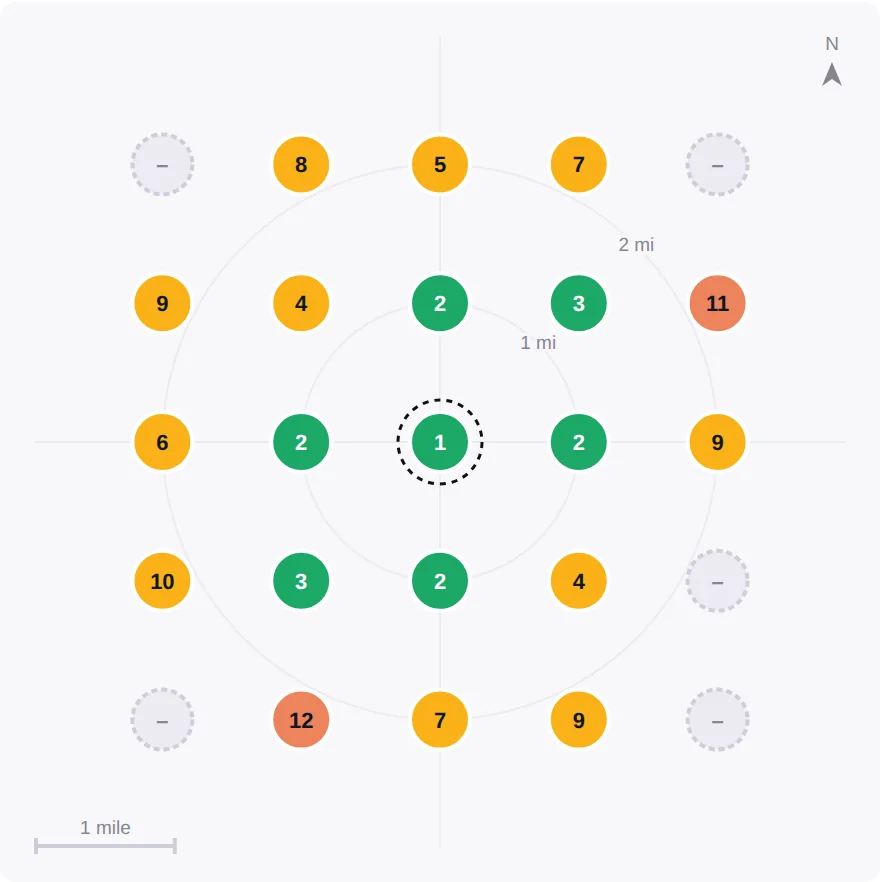
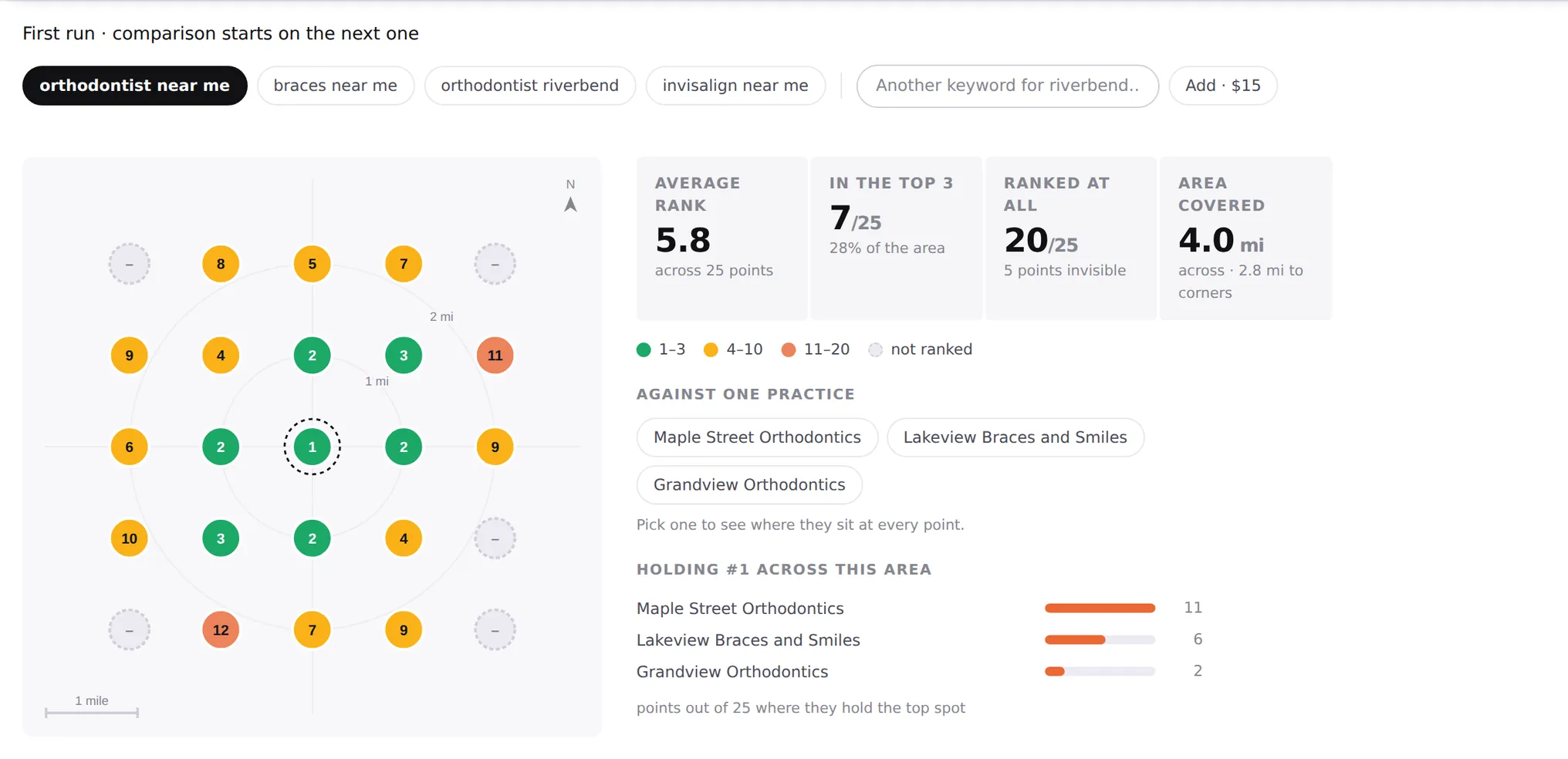
Twenty-five search points laid out around your office, a mile apart, on the phrases a patient types. Each point shows your position and the practices ranked above you there. This is the part a map pack ranking check normally hides: you do not have one position in a city, you have a different one on every street, and a practice two miles away can beat you on one side of town while you beat them on the other.
Findings written as sentences
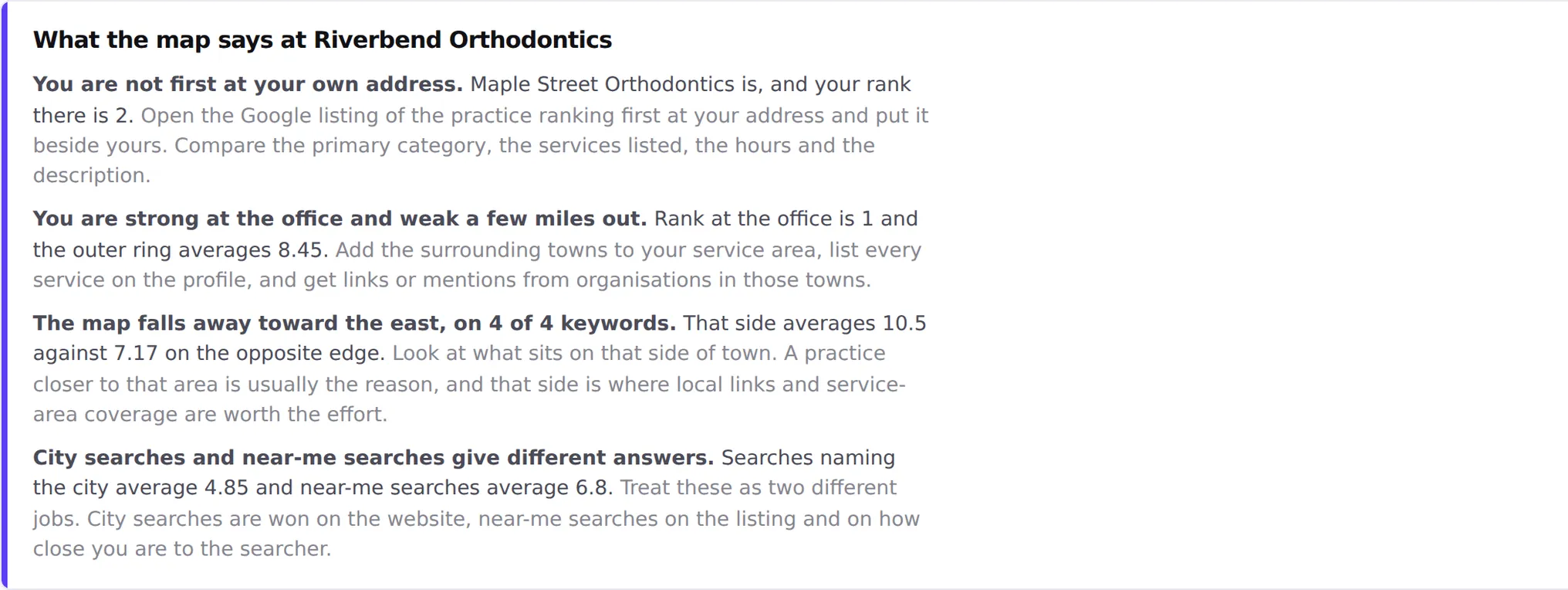
Every section ends with what it found, in words, with the number it came from attached. No visibility index, no traffic light, nothing you have to learn to read. If a finding cannot be stated as a sentence with a real number in it, it does not appear.
Google Business Profile and reviews
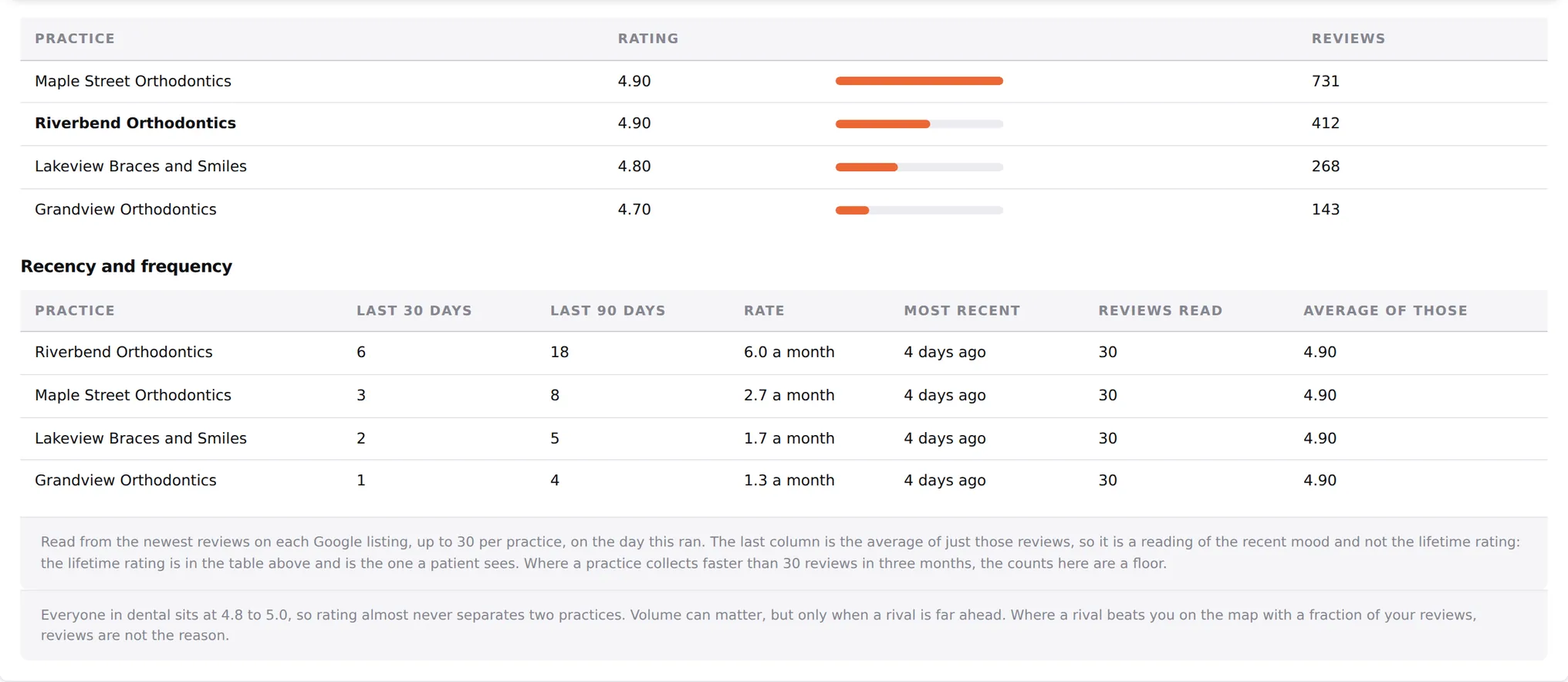
Your listing next to the practices beating you: rating, review count, photos, categories, and how fast each one is collecting reviews now rather than how many they have collected since 2014. Volume rarely separates two dental practices. Pace often does.
Competitors and links
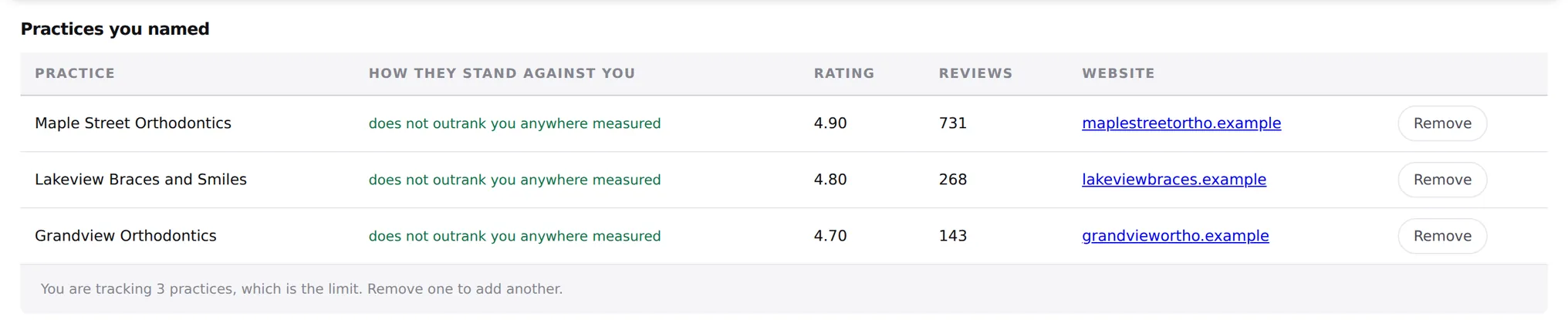
Name the practices you actually compete with and the report measures them specifically, at every grid point, so "they rank above you" always comes with a number attached. It also compares link profiles and domain strength, which is usually the reason a rival holds the normal results even when your profile is stronger.
Site health
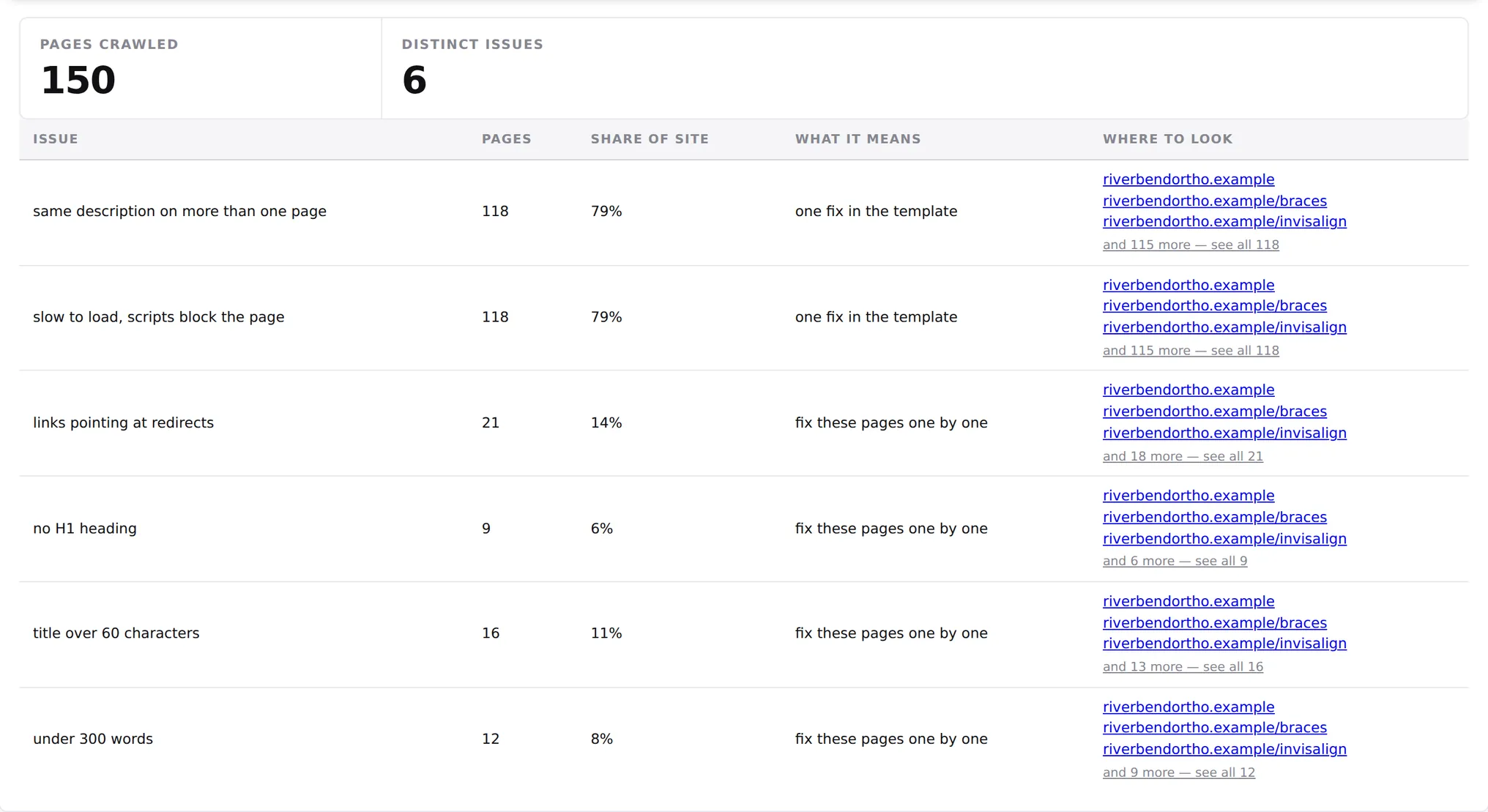
A crawl of up to 150 pages of your website: titles, headings, thin pages, duplicate meta descriptions, redirect chains, render-blocking scripts. Every issue names the pages it affects and says whether it is one fix in your template or a page-by-page job.
Keyword positions and AI visibility
Where your website sits in the standard Google results for the searches that matter in your city, measured from your office coordinates rather than from a server somewhere else. Alongside it, which AI and answer features appear on those searches, so you can see where Google is answering the question above the results instead of sending the click to anybody.
Who it is for
The keyword set changes with what you do, because an orthodontist and a general dentist in the same building compete against completely different practices for completely different phrases. Specialties supported:
- Orthodontics and braces practices
- General and family dentistry
- Pediatric dentistry
- Oral and maxillofacial surgery
- Periodontics
- Endodontics
- Combined general and orthodontic offices
- Multi-location groups and DSOs
How it differs from Semrush, Ahrefs and BrightLocal
Those are excellent general tools, and if you are an SEO professional you should probably keep one. This is a Semrush alternative for people who are not: it does less, for one industry, and explains what it found in words a practice owner can act on the same afternoon.
- The keywords are already chosen. You do not build a keyword list. Pick your specialty and the searches your patients actually use are loaded for you, split into city searches and near-me searches because they behave differently.
- The findings are sentences, not scores. No visibility index out of 100. Each finding says what is happening, where, and what to do about it, and every claim carries the number it came from.
- Nothing is measured by name. Practices are matched on their Google listing ID, so a report never confuses two offices that share a name, which is constant in dentistry.
- No annual contract. A local SEO report for one section starts at $10 and runs immediately. The first map grid is free.
Frequently asked questions
How do I rank higher on Google Maps as a dental practice?
Three things move the map pack: how close the searcher is standing to your office, how complete and active your Google Business Profile is, and how strongly the rest of the web treats you as the practice for that area. You cannot change the first one, which is why no practice ranks first across a whole city. The report separates the part you can change from the part you cannot, so you stop spending money on the second kind.
Why is my practice not showing up in the map pack?
Usually one of four things: you are being measured from a point far enough away that closer practices win, your primary category is wrong for what you actually do, your profile has gone quiet next to rivals still collecting reviews weekly, or your website is not strong enough to hold the normal results that feed the map. The grid tells you which one it is, because it shows exactly where you disappear.
What is a local SEO report and how often should I run one?
It is a measurement of where a single location stands in its own market on one day: map positions, search positions, profile, reviews, competitors, and the health of the website behind it. Once a month is enough for most practices. Run one before you change something and one after, because a change you cannot measure is a change you cannot judge.
Do I need to connect Google to use it?
No. Everything above runs without any access to your accounts. Connecting Google Search Console and Analytics is optional and only adds your own click and traffic data to the report.
What does it cost?
Your first map grid is free and needs no card. After that you can buy a single section from $10 and it runs straight away, or take the full report on every office. See pricing for the current sections and plans.
Does it work for a practice with several locations?
Yes. Each office is measured on its own grid with its own competitors, because two offices of the same practice have different rivals and usually different problems. The report keeps them separate and compares them side by side.
Run one and see
The first map grid is free, needs no card, and takes about a minute. You will know within the hour whether the practice down the road is beating you, and on which side of town.